Streamlining Referral Processing by 86%
Shipped
Desktop Design
0 to 1
Accessibility
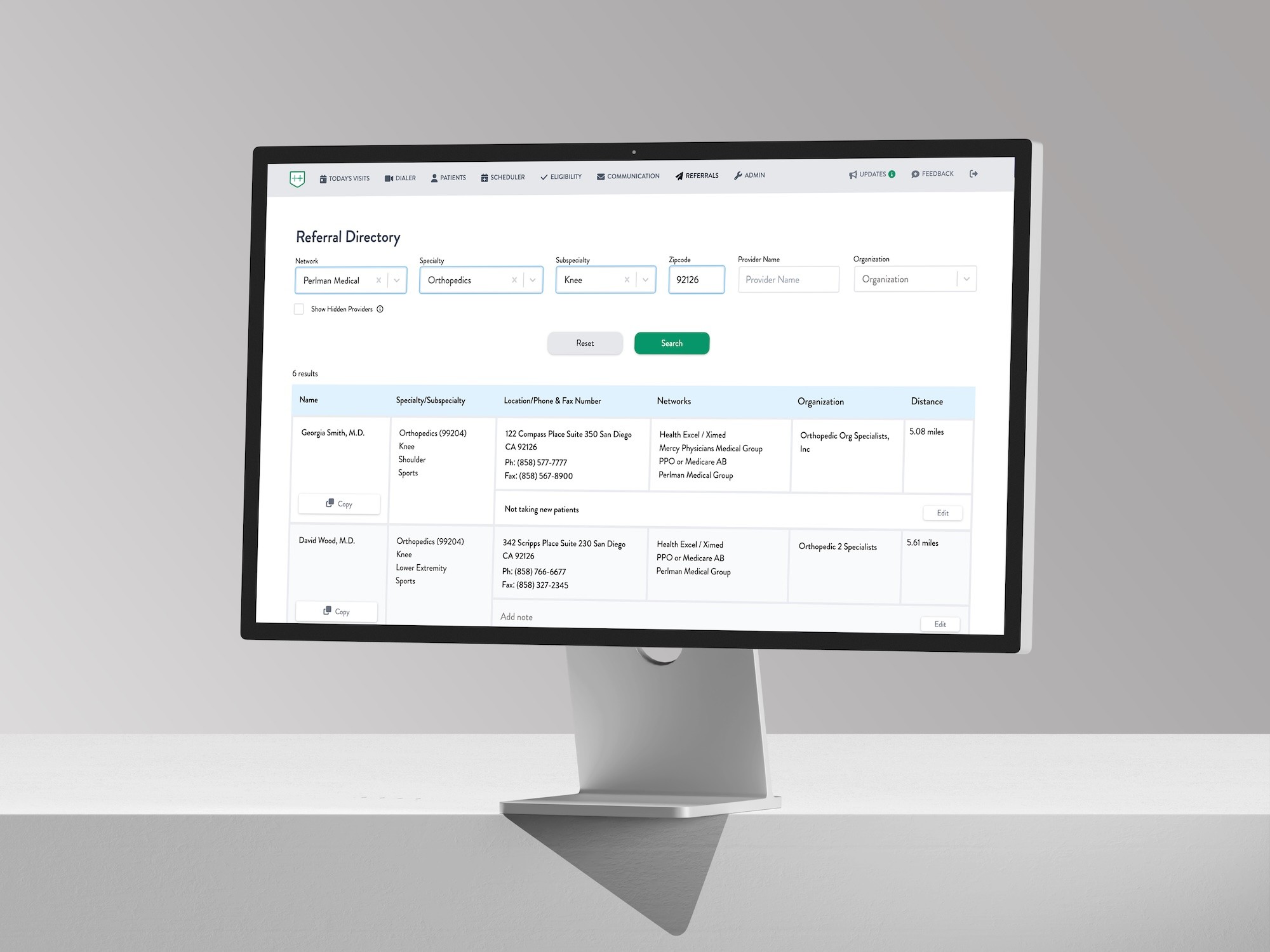
Overview
The referrals team at Perlman Clinic was stuck working around a disorganized, outdated system that made an already complex job way harder than it needed to be. Training took up to 6 months. Placing a single accurate referral could take anywhere from 3 minutes to 13 minutes. And they were doing this thousands of times a day.
I led this project end-to-end as the sole designer, handling everything from research through final prototype.
My Role
As the sole UX designer, I led end-to-end design ownership from staff research through successful implementation. My key responsibilities included:
Conducted comprehensive user research and 10+ hours of shadowing the referral coordinators
Collaborated with stakeholders across marketing, PM, and development teams
Designed the complete experience that directly addressed both patient needs and business objectives.
Results
By consolidating multiple systems into a single, intuitive interface, the custom-built directory reduced referral processing time by 86%.
Role
Perlman Clinic
Skills
4 weeks
Timeline
Product Designer
Tools
Figma
85%
Faster processing
40%
Increase in accuracy
86%
Reduction in time spend
Problem
No central source of truth for specialist info
Staff needed to cross-reference a patient's medical group, specialty, and location to find the right specialist, but there was no single place to do that reliably. Information was scattered, stale, and hard to act on quickly. Errors were piling up, and new hires had no efficient way to learn the system.
Research
10+ hours of shadowing showed exactly where things broke down
Key insight #1
Incomplete Information
Staff had to Google providers due to missing or scattered subspecialty details.
Key insight #2
Geographic Confusion
Unfamiliarity with locations led to inaccurate travel estimates and rejected referrals.
Key insight #3
Training Gaps
Each medical group had different rules and portals, making training difficult.
Workflow mapping

The biggest problem was a repetitive loop in the middle of the flow. Staff would search for a matching specialist, potentially Google subspecialty details, cross-reference Google Maps for distance, and if the distance didn't work, start over. This loop alone cost 5 - 20 minutes per referral.
Mapping this out made the solution direction clear: collapse the middle of the flow into one place where staff could find everything they needed without switching tabs.
Problem Statement
How might we consolidate essential referral information into a single, easy-to-navigate tool?
The problem statement highlighted three key requirements: accurate subspecialty matching, geographical proximity, and formatting the information to send to the patient, all accessible within a unified interface that would reduce cognitive load and training complexity.
Usability Testing
Validated efficiency and accuracy gains through task-based usability testing with referral coordinators
I conducted 7 moderated usability tests with referral coordinators using an interactive Figma prototype. Each session compared the current workflow vs. the directory across realistic referral scenarios.
Method
Task-based evaluation grounded in real workflows
Participants completed timed scenarios using both their existing tools (Epic, portals, Google) and the new directory:
Find the closest specialist by zip code + specialty
Identify correct subspecialty providers
Complete full referral workflow from Epic → portal → MyChart
I captured:
Task completion time
Referral accuracy (closest + correct provider)
Ease of use (1–10 rating)
Qualitative feedback on usability + edge cases
Key Metrics
Significant gains in speed and accuracy
86.2% faster referral completion
3:31 → 0:29 average timeUp to 7m 35s → 52s max time reduction
+40% improvement in referral accuracy
(More coordinators selected the closest appropriate provider)10/10 average ease-of-use rating across participants
Design Implications
Directly informed product decisions
Prioritized subspecialty coverage
Defaulted to distance-based sorting
Introduced provider notes + copy-ready formatting
Challenges
Prioritized for Impact
The most significant challenge was technical feasibility. We couldn't immediately integrate all eight medical groups due to API limitations and data access constraints.
So, I identified the top 3 groups causing 65% of staff pain points using stakeholder interviews and usage analytics.
We prioritized those for launch and created a roadmap for the rest.

